
We are living in the age of AI. Almost every modern application or website offers some level of AI integration. Whether it is Google Docs, WhatsApp chat, or Zoom, you will come across an AI integration, especially chatbots, which have become essential tools for enhancing user engagement and support. So why not build one tailored for your own application?
A well-designed chatbot doesn’t just answer questions—it creates interactions that enhance user experience and build loyalty. The convergence of advanced AI technologies with robust web frameworks has opened new possibilities for businesses to deploy intelligent conversational agents that truly understand user intent.
In this tutorial, we will walk through the steps to build a chatbot application for the Symfony Documentation along with Doctrine ORM and MongoDB Doctrine ODM documentation pages. This application would help you answer Symfony-related questions related to ORM or ODM with structured, accurate, and context-aware responses. A chatbot, in general, uses the powerful AI techniques called retrieval augmented generation, or RAG.
What is retrieval augmented generation (RAG)?
RAG is a technique that enhances traditional language models by combining them with a retrieval system. This is how it works:
- Retrieval: When a user prompts a question, the system retrieves information from the knowledge base or database.
- Augmentation: The retrieval document is then passed to the large language models, or LLMs, to generate the response.
- Generation: The final response is crafted by the LLMs, but it’s based on the real-world content that was fetched during the retrieval step.
The below diagram provides you with more context on how the RAG applications are created.
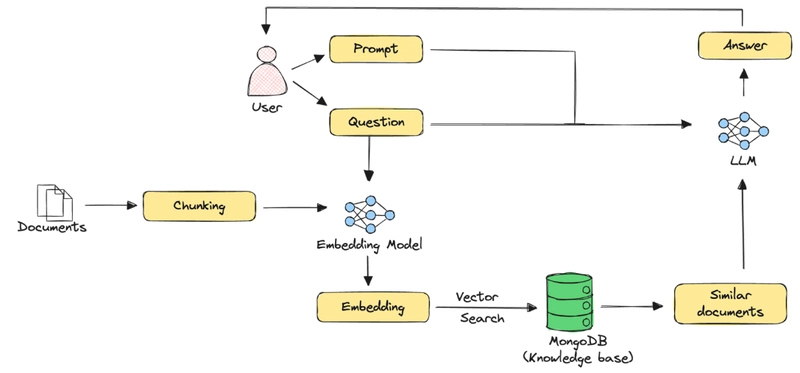
In this comprehensive guide, we will walk through all the steps required for building a chatbot application using the Symfony framework. We are using the source files of the documentation of Symfony and Doctrine from their GitHub repositories to clone all the files on a local system and then import them into MongoDB in the form of chunks.
The chunks are basically partitions of a complete document to be stored in the database. We will be using LLPhant, a comprehensive PHP generative AI framework. Further, we are making use of Voyage AI to generate the embeddings and later using the OpenAI LLM model for formatting our responses.
Let’s understand each of these steps in detail.
Project overview
This chatbot application uses the RAG architecture to provide accurate responses based on Symfony documentation. Key components include:
- Symfony back end: Manages API communication, handles user queries, and integrates with MongoDB, Voyage AI, and OpenAI
- MongoDB: Stores chunked Symfony documentation and corresponding vector embeddings; uses Atlas’s vector search for retrieving relevant content
- Voyage AI: Converts documentation chunks into semantic vector embeddings for efficient similarity search
- OpenAI: Generates context-aware responses using retrieved documentation snippets and user queries
- Twig front end: Provides a simple web interface for user interaction and response display
Setting up the development environment
To start setting up the environment for the project, we need to have a few things ready:
- Create an Atlas cluster: Create your first free cluster. Follow the MongoDB documentation page, Deploy a Free Cluster, or make use of the MongoDB Model Context Protocol (MCP) Server to create your free cluster. You can follow the documentation on the MCP market for detailed steps.
- PHP 8 and above: Download the latest PHP version from the official site’s downloads page.
- Symfony version 7 and above: Get the steps to install Symfony from the documentation.
- Creating a Voyage AI API key: Get your Voyage AI API key from the Voyage AI documentation page. Also, make sure to set the pricing so that embeddings are being created.
- OpenAI API key: Create your OpenAI key from the API key page.
Creating the Symfony chatbot application
Creating the Symfony project
To create the Symfony project, you need to follow the steps below:
composer create-project symfony/skeleton SymfonyDocsChatBot

Once the project is created, a few dependencies need to be downloaded. These steps will be addressed sequentially as required.

Setting up project dependencies
To build the chatbot application, there are a few dependencies we need to install.

We will be using LLPhant to perform the chunking of the documents. To install in your Symfony application:

composer require theodo-group/llphant

In order to store the chunks into MongoDB, we need to have Doctrine MongoDB ODM installed with the Symfony application. To do so:

Install the MongoDB extension using PECL:

pecl install mongodb

Once installed, install the Doctrine Bundle. The bundle integrates the Doctrine MongoDB ODM into Symfony, helping you to configure and use it in your application. To do so:
composer require doctrine/mongodb-odm-bundle

To create the front end, we will be making use of Twig. It is a fast, secure, and flexible templating engine for PHP used to build clean and structured HTML views in Symfony applications.

composer require symfony/twig-bundle

In this application, we are sending HTTP requests to Voyage AI and OpenAI to perform embedding and formatting of the response. To make use of HTTP requests, install the guzzlehttp package repository.

composer require symfony/http-client

Finally, to have a better look and feel of the response being generated, we will make use of CommonMark, which converts the Markdown into HTML format. To do so:

composer require "league/commonmark”